
You’ve got the tools, the drive, and a save file begging for a rewrite. This guide cuts straight to the game’s guts—three high-impact mods: injecting cash into your wallet and kitchen stash, resetting your sobriety counter for that annoying achievement, and twisting character relationships into whatever you want. Skip the grind, hit the source code with a text editor and a few key parameters. Just data.
Locating the Core
Your save file isn’t hidden in some cryptic folder. It’s sitting right where you’d expect. Navigate to your Windows drive (usually C:), then:
Users > Your Username > AppData > LocalLow > The Growing Stones > SisterRay
Inside, you’ll find your save files. Always work on a copy. Create a fresh in-game save before editing so you’ve got a clean fallback. Trust me, I learned this the hard way—don’t skip this.
The Critical Edit: Money, Stash, and DaysClean
Open your save file with Notepad. You’ll see a wall of text—don’t panic. We’re hunting specific strings. Hit Ctrl+F and find:
- Money: Your wallet cash.
- MoneyStash: Cash hidden in your kitchen.
- DaysClean: Days without using cats.
Change the number next to each. Swap Money=150 to Money=99999. For DaysClean, set it to 365 or higher—might trigger that sobriety achievement on your next load. This is your main lever.
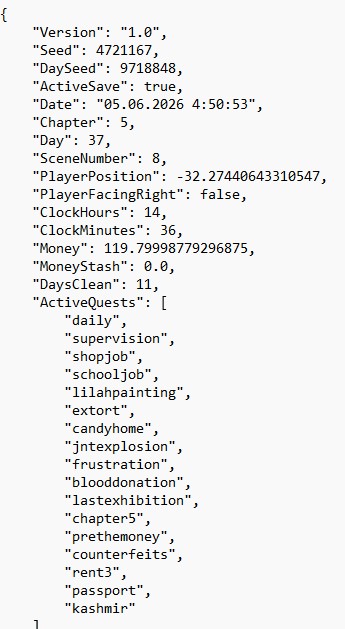
Notepad view of a save file with the Money, MoneyStash, and DaysClean parameters highlighted.
Rewriting Relationships: The Attitudes Array
Below the cash and sobriety data, you’ll find the Attitudes array. It’s a list of numbers—relationship points with each character. The order is fixed, so you need to map which number goes to which character.
Looks like: Attitudes=50,30,80,0,10. Each number is affection. To max a relationship, change it to 100 or 999. Start with 100. Save, load in-game, check the character’s dialogue or relationship screen to verify.
The Attitudes array in the save file, with three values highlighted for editing.
The Time Loop: One Day for All Quests
You can break time too. Find ClockHours and ClockMinutes. Set ClockHours=6 and ClockMinutes=0 to reset the game to early morning. This lets you complete quests locked to specific times—effectively doing every quest in a single day. Dev bait roast: whoever designed that time-gating needs a reality check.
The Load Order: A Critical Warning
Here’s the biggest trap. If you save in-game, exit, edit the file, save it, then re-enter, your changes won’t apply automatically. You must manually load the edited save from the in-game menu.
Correct workflow:
- Save your game in a new slot.
- Minimize or exit the game.
- Open the save file, make edits, save it.
- Launch the game and manually load that save.
Alternatively, stay in the game. Save in-game, edit the file while the game’s running, save it, then load that save from the menu. Changes take effect instantly. In my experience, the second method is faster.
Final Checks
After loading your modified save, check your wallet and kitchen stash immediately. If the numbers stick, the edit worked. Talk to a character whose attitude you changed—their dialogue should match the new value. For DaysClean, you might need to sleep or advance a day for the game to register the change and unlock the achievement.
Editing a save file is precision work. One wrong digit can corrupt the file. If something breaks, your backup save is your only lifeline. Keep it safe.


