
If you’ve ever changed your monitor settings in Sin Slayers: Meat & Greed and suddenly found the game completely vanished from your screen, don’t panic. You’re not alone. This is a known bug caused by the game accidentally selecting a non-existent monitor (Monitor “0”). Here’s a simple step-by-step fix to get you back in the action.
Step-by-Step Fix
Step 1: Force Close the Game
If the game is frozen or unresponsive, press Ctrl + Alt + Delete and open Task Manager. Find Sin Slayers: Meat & Greed in the list, right-click it, and select End Task.
Step 2: Locate the Settings File
- Open Steam and go to your Library.
- Right-click Sin Slayers: Meat & Greed, then select Manage > Browse Local Files.
- This will open the game’s installation folder.
Step 3: Open the Settings File
- In the folder, look for a file named settings (it may have no file extension).
- Right-click it and choose Open with > Notepad (or any text editor).
Step 4: Find and Edit the Display Line
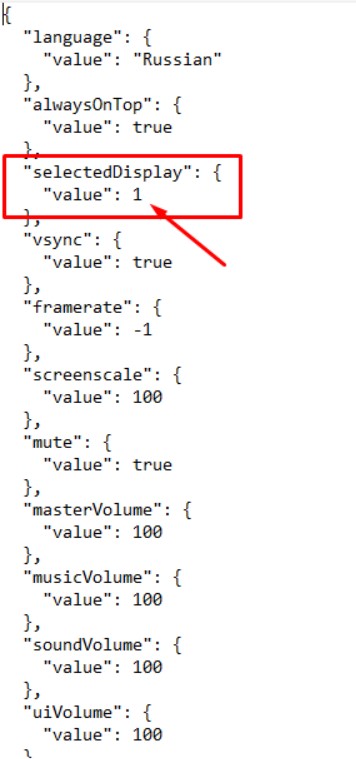
- Inside the file, search for this line:
"selectedDisplay": { "value": 0 } - Change the
0to1(or the number of your main monitor, usually1):"selectedDisplay": { "value": 1 }
Step 5: Save and Launch
- Press
Ctrl + Sto save the file. - Close Notepad and launch the game again. It should now appear on your primary monitor.
Tips
- If the file is corrupted or the edit doesn’t work, simply delete the settings file entirely. The game will create a new one with default settings the next time you start it.
- Make sure your monitor is properly connected and detected by Windows before editing the file.
- If you have multiple monitors, try setting the value to
0,1, or2to match your active display.
Summary
This monitor selection bug in Sin Slayers: Meat & Greed is easy to fix once you know where to look. Just edit the settings file and change the display value, or delete the file to reset everything. Have you run into this issue before? Let me know in the comments if this guide helped you get back to slaying!


