
I hit the Mistlands in Valheim 1.0 and my bag was still overflowing with ore, seeds, and half-eaten food. Turns out the game finally gives you a real fix — and you don’t need to touch a single mod. Here is every no-mod route I’ve tested, from the legit Haldor upgrades to the built-in console commands that push you all the way to nine rows.
Quick Answer
- Default inventory: 4 rows.
- Legit upgrades: 2 extra rows (16 slots) total — bought from Haldor the trader.
- Max with console commands: 9 rows.
- Gold needed for both legit upgrades: 3,000 (1,000 + 2,000).
- PC console: press F5, type
devcommands, theninventorysize [1-9]. - PS5: hold L1 + L2, press Options, press X, type
devcommands, press R2 for Done. - Xbox: hold LB + LT, press Menu, press A, type
devcommands, press RT for Done.
What actually changed in Valheim 1.0
Valheim 1.0 adds two extra inventory rows you unlock through normal progression — no mods required. That takes you from the default 4 rows up to 6 rows, which is 16 extra slots.
The two official upgrades are called wider pockets and deeper pockets, and both are bought from Haldor, the trader. Two quick notes before you get excited: these are not dedicated armor slots, and item stacking behavior is unchanged. You’re just getting more grid space.
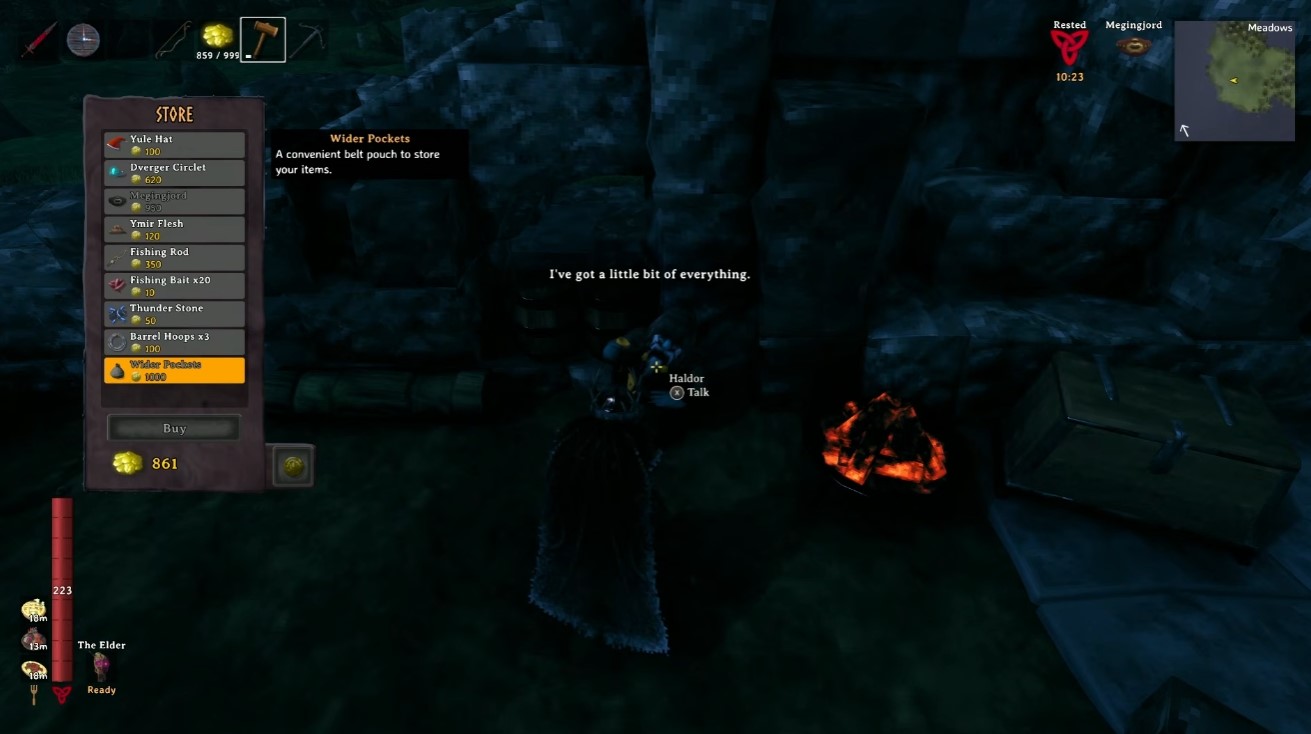
How I bought ‘Wider Pockets’ for 1,000 gold
This is the first legit upgrade, and it’s gated behind the Mountains boss. Here’s the exact order I did it in:
- Progress to the Mountains biome.
- Defeat the boss found in the Mountains.
- Locate Haldor, the trader. He spawns randomly as you explore — there are several possible spawn points based on radius from your starting point, and the first one you find becomes the trader for that world.
- Buy Wider Pockets from Haldor for 1,000 gold.
Tip: The trader often stocks new items after you defeat each boss. I always check back with my trader after every boss kill for new goods.
How I bought ‘Deeper Pockets’ for 2,000 gold
The second upgrade is gated behind the Mistlands boss, so it’s a late-game purchase. Same routine, higher price:
- Progress to the Mistlands biome.
- Defeat the boss found in the Mistlands.
- Return to Haldor.
- Buy deeper pockets from Haldor for 2,000 gold.
Combined with wider pockets, this gives you 16 extra inventory slots (2 additional rows) through entirely legitimate means.
How to unlock 3 more rows with console commands (still no mods)
If you’re on PC and want the absolute max, console commands can grant up to 3 additional inventory rows beyond the 2 legit upgrades — that’s 9 total rows. No mods or downloads required. Here’s the sequence:
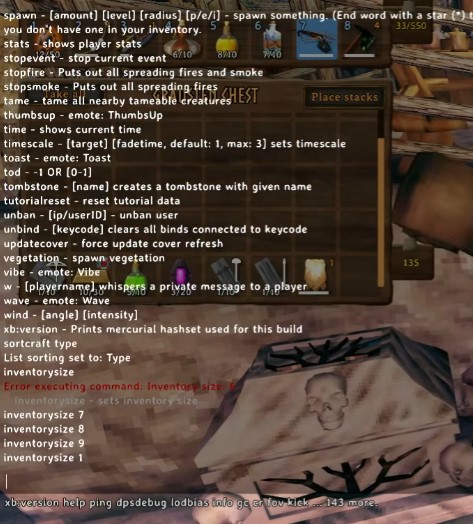
- Press F5 to open the console command bar.
- Type
devcommands(all one word) and press Enter. This enables cheats. - A warning appears noting that some commands may invalidate trophies/achievements, even on PC. Confirm to proceed.
- Type
inventorysize 1— only the hot bar. - Type
inventorysize 2— one extra row. - Type
inventorysize 3— two extra rows. - Type
inventorysize 4— default (4 rows, no upgrades). - Type
inventorysize 6— 4 rows plus the 2 legitimate upgrades. - Type
inventorysize 7,8, or9— the 3 additional rows only obtainable via cheats.
To reset, type inventorysize 4 (default) or inventorysize 6 (with both upgrades).
How I turned on console commands on PS5 and Xbox
Console players aren’t locked out. The button combos differ per platform, so here’s what I found:
PlayStation 5
- Hold L1 + L2.
- Click the Options button to bring up the console command bar.
- Press X to open the text field.
- Type
devcommands(all one word). - Press R2 for Done.
- A warning appears. Confirm to proceed.
- Type
inventorysize 9to get the full amount of slots available.
Xbox
- Hold LB + LT.
- Press the Menu button to bring up the console command bar.
- Press A to open the text field.
- Type
devcommands(all one word). - Press RT for Done.
Note: Xbox previously required LB + LT + RB + RT + Menu, but this has reportedly been changed to match the PlayStation method (LB + LT + Menu). Nintendo Switch isn’t tested, but it’s likely the same concept — check your controller buttons.
What I’d watch out for with achievements and trophies
Using devcommands triggers a warning that some commands can invalidate trophies/achievements, even on PC. The warning appears before any cheats are used, and simply enabling devcommands does not immediately disable achievements — it’s using certain commands afterward that does.
Commands that may invalidate trophies/achievements:
- Commands that spawn items
- Commands that enable full creative mode
- Commands that allow crafting or spawning anything
- Commands that kill bosses
Commands that may be safe:
- Emote commands (though the emote wheel exists)
- The fly command — the devs consider it a help feature in case your game is broken or your bag is unretrievable
env clear— clears weather (type it to make it a clear blue summer day)
Warning: If you use these commands on a character/world, using that character in another world may trigger a warning that achievements/trophies will be disabled in that world too. The game makes you confirm a cheat to be triple sure.
Gold math and what might come next
Total gold needed for both legitimate upgrades: 3,000 gold (1,000 for wider pockets + 2,000 for deeper pockets). That’s the full legit ceiling.
| Method | Rows Gained | Total Rows | Cost |
|---|---|---|---|
| Default | 0 | 4 | Free |
| wider pockets | +1 | 5 | 1,000 gold |
| Both upgrades | +2 | 6 | 3,000 gold |
| Console commands | +5 | 9 | Free (cheats) |
In the preview build, the upgrades were originally gated behind different bosses — possibly Yagluth and The Queen. There are 3 additional rows unlockable only via cheats, which has led to speculation that the devs might add an upgrade for each boss in the future. No plans are confirmed, but a day-one update could potentially add extra slots to traders — so check with every boss you kill.


