
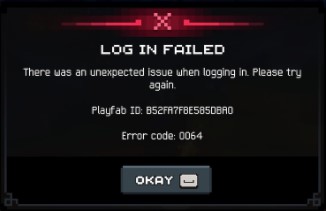
When I hit Error 0029 and 0064 trying to open the game, I could not log in at all. I read what worked for a few other players and tried each one. Here is what seems to get you into the game.
How to Fix Error 0029 and 0064
Update the Xbox App and Xbox Game Bar
These two do not always stay up to date the way they should, and when they fall behind they cause linking problems. Open the Microsoft Store and check that neither one has a pending update. This step is easy to skip, but it is the first thing I would check.
Sign In to the Xbox App
Sometimes the Xbox app is simply signed out. Open it up and make sure you are signed in before you try anything else.
Link Steam to Your Xbox Account
This was the fix that finally worked for me — after linking, I got into the game. Open the Xbox app, click your user name in the top left, go to settings, and at the bottom link your Steam account. Once it is linked, reboot the game.
Do Not Run the Game as Administrator
Running as admin appears to break the Steam link and triggers error 0029. If your game is running as admin, or you see a UAC prompt when you launch it, you need to find out why and turn it off. The usual cause is the check box in the compatibility tab — right-click the executable, open properties, and check there.
If you find anything else that gets you into the game, share it below. These were my findings.


